















Your AI. Your pricing data. Smarter decisions.
Connect your AI assistant to Multiply. Explore your competitive landscape, understand pricing decisions and spot opportunities in plain language.
Works with MCP-compatible AI assistants.
- 4.8/5
Customer reviews on Trustpilot
- 4.9/5
39 verified reviews on Capterra
- 4.9/5
Average rating on G2

From competitive insights to clear pricing decisions.
Six examples of what you can ask about your prices, competitors, Buy Box results and pricing strategies.

01 / 06
Understand your competitive position
See where you're losing competitiveness across your catalog, and which products to look at first.
Question: How competitive are my prices compared with the market?
Here's how your 100 products with competing offers are priced.
| Position | Products |
|---|---|
| Below market | 28 |
| In line with market | 46 |
| Above market | 26 |
Start by reviewing products priced above comparable offers.
Illustrative example

02 / 06
Explain why a product has its price
Your strategy, competitors, Buy Box and min/max limits, traced step by step. No black box.
Question: Why is this product priced at $129.90?
- Your current price
- $129.90
- Closest competitor
- $127.50
- Your pricing strategy
- Universal Buy Box
- Your price limits
- $119.00 to $149.00
Based on the available data, your price is $2.40 above the closest competitor and within your limits.
Illustrative example

03 / 06
Combine Multiply with your other data
Cross your Multiply pricing data with sales, inventory or ERP data from other sources connected to your assistant.
Question: Which products have strong sales but are losing price competitiveness?
- Multiply · Price position
- Sales tool · Sales trend
| Product | Sales trend | Price position |
|---|---|---|
| Wireless earbuds | ↑ 18% | 6% above market |
| Desk lamp | ↑ 12% | 4% above market |
| Travel mug | ↑ 9% | 3% above market |
All three are selling well but now priced above competing offers.
Sales trends come from the sales tool connected to your assistant, not from Multiply.
Illustrative example
04 / 06
Decode competitors' pricing patterns
Spot recurring moves in competitor activity and price history, and decide how to respond. Patterns are inferred, not certain.
Question: How have my prices compared with my main competitor's over the last 30 days?
- You $49.90
- Competitor A $48.90
- Competitor cheaper
Both prices moved all month. Competitor A undercut you three times and is now $1.00 below you, a good moment to review your pricing strategy.
Illustrative example
05 / 06
Build a strategy around your objectives
Describe your goal and get a concrete pricing strategy recommendation, weighed against your price limits and Buy Box results.
Question: Which products could I review to improve competitiveness while protecting margin?
Three products to look at, by priority:
- Review Product A. Priced 6% above comparable offers, with margin headroom.
- Monitor Product B. Competitor prices are trending downward.
- Keep Product C under observation. Already competitively positioned.
Margin checks use the product costs available in Multiply.
Illustrative example
06 / 06
Turn pricing insights into clear priorities
Get a ranked shortlist of products worth a pricing review, with the reasons. You decide what to change in Multiply.
Question: Which 10 products should I review first this week?
| # | Product | Reason |
|---|---|---|
| 1 | Wireless earbuds | Above competitor price |
| 2 | Desk lamp | Recent competitor price drop |
| 3 | Travel mug | Significant price gap |
| 4 | Phone stand | Above competitor price |
+ 6 more products in the full list
These are the products I'd review first.
Illustrative example

Your AI is only as good as the data behind it.
AI can give you general pricing advice. Connect it to Multiply, and it can analyze your actual catalog, competitor prices and pricing history to help you make more informed decisions.
- 01 Your actual prices Work with the prices and products in your own catalog, not hypothetical examples.
- 02 Your competitive reality Understand how your offers compare with competitors and how that position changes over time.
- 03 Your business constraints Put recommendations in the context of your pricing limits and available cost data.
Data your team already prices with, now in your AI assistant.
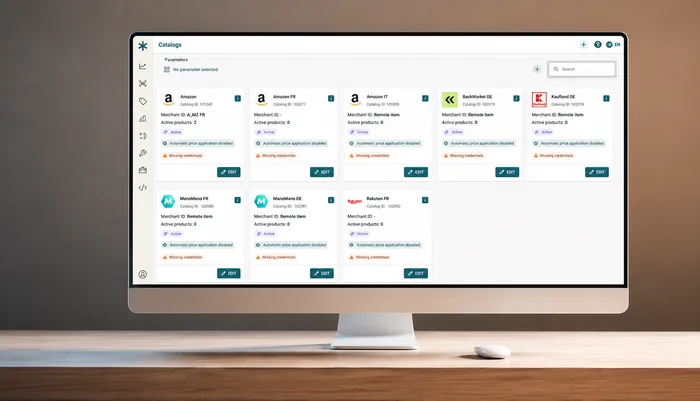
These are the Multiply screens behind every answer.

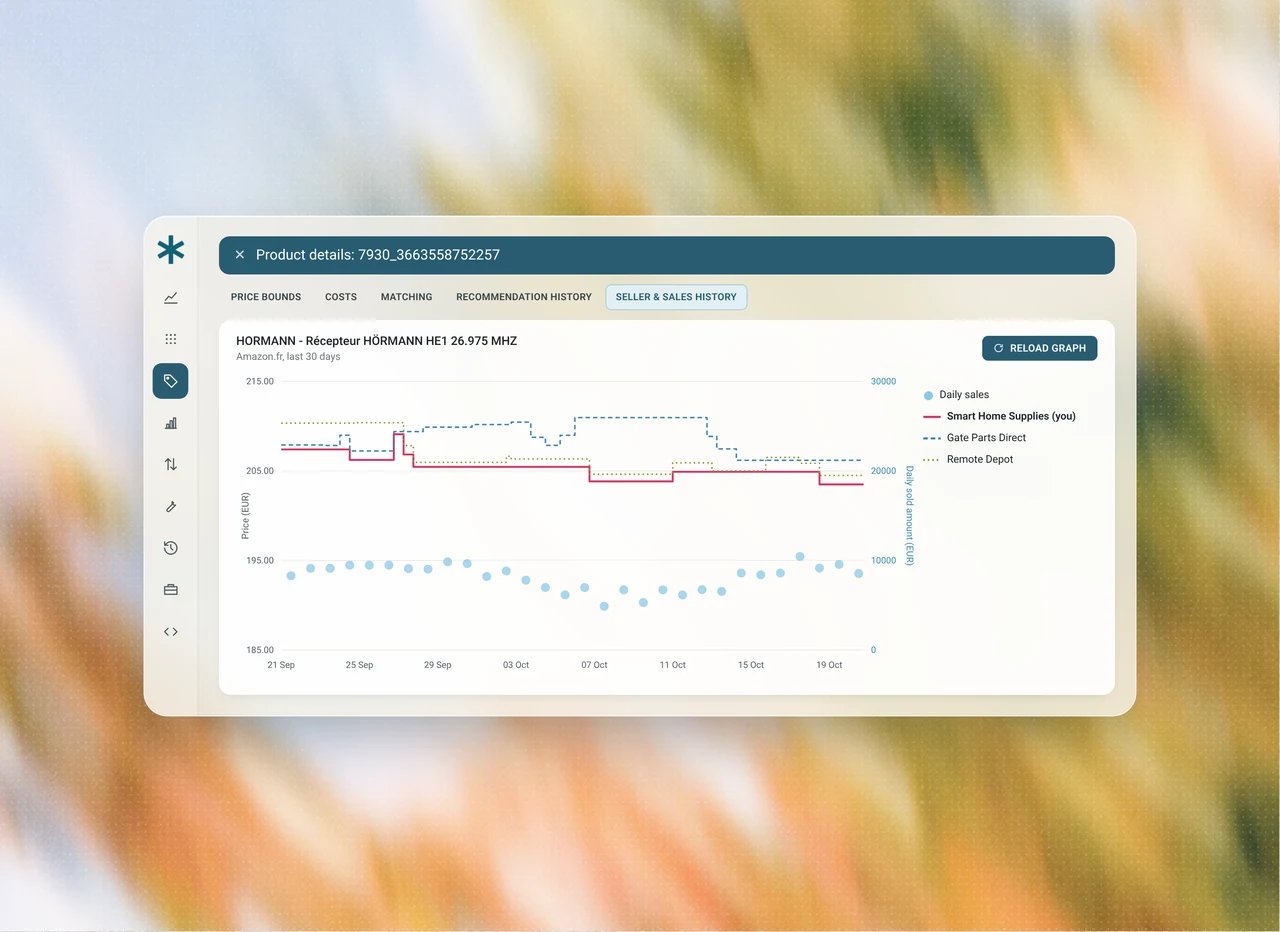

Competitor offers, Buy Box status and price changes, tracked continuously for every product on the marketplaces you connect.
Each price and recommendation is stored with the strategy, competitors and limits behind it.
Revenue, sales and Buy Box results by marketplace, where your marketplaces report them, so you can see what your pricing decisions changed.
Connect Multiply to your AI assistant.
Three self-service steps. You can set it up yourself in a few minutes, with no call or manual activation.
- Add the connector Find and add the Multiply MCP Connector to your preferred AI assistant.
- Connect your account Authorize your AI assistant to access your Multiply data.
- Ask your first question Start with "Which 10 products should I review this week?" and explore your pricing data in natural language.
Want help choosing your first questions? A Multiply expert can walk you through it. It's optional.
You have questions?
We have answers.
A connector that lets the AI assistant you already use work with your Multiply data. It uses MCP (Model Context Protocol), an open standard for connecting AI assistants to external tools.
Ask questions about your pricing in plain language. Analyze a catalog's performance, find out why a SKU has its price, check who wins the Buy Box, review competitor activity, and get pricing strategy recommendations and priorities.
AI assistants that support MCP connectors, for example ChatGPT and Claude. Connector support depends on your assistant and its plan. Add Multiply as a connector in your assistant and it retrieves your Multiply data when you ask a pricing question.
Data from the Multiply account you connect, such as your catalogs, current prices, minimum and maximum limits, competitor offers and activity, Buy Box status, pricing strategies, recent price recommendations, sales where your marketplace reports them, and the history of changes to your settings. What is available depends on your account setup.
Yes, if your assistant is also connected to them, such as marketplace sales, ERP or analytics tools. Those sources connect to your assistant, not to Multiply.
No. In the current version of the Multiply MCP Connector, your AI assistant can access available pricing data, analyze your competitive position and help you develop pricing recommendations. It cannot change prices or modify repricing rules in Multiply. You apply the strategies you choose in Multiply, as you do today.
Your assistant only reaches the data of the Multiply account you connect. It cannot change your prices, pricing strategies or repricing rules, so there are no pricing changes to approve.
Your assistant accesses only the Multiply account you connect. The data it retrieves is processed by your AI provider under that provider's terms.
Yes. The Multiply MCP Connector is free and available on every Multiply plan.
Add the Multiply MCP Connector to your preferred AI assistant, authorize access to your Multiply data, and start asking questions about your pricing and competitive landscape.